
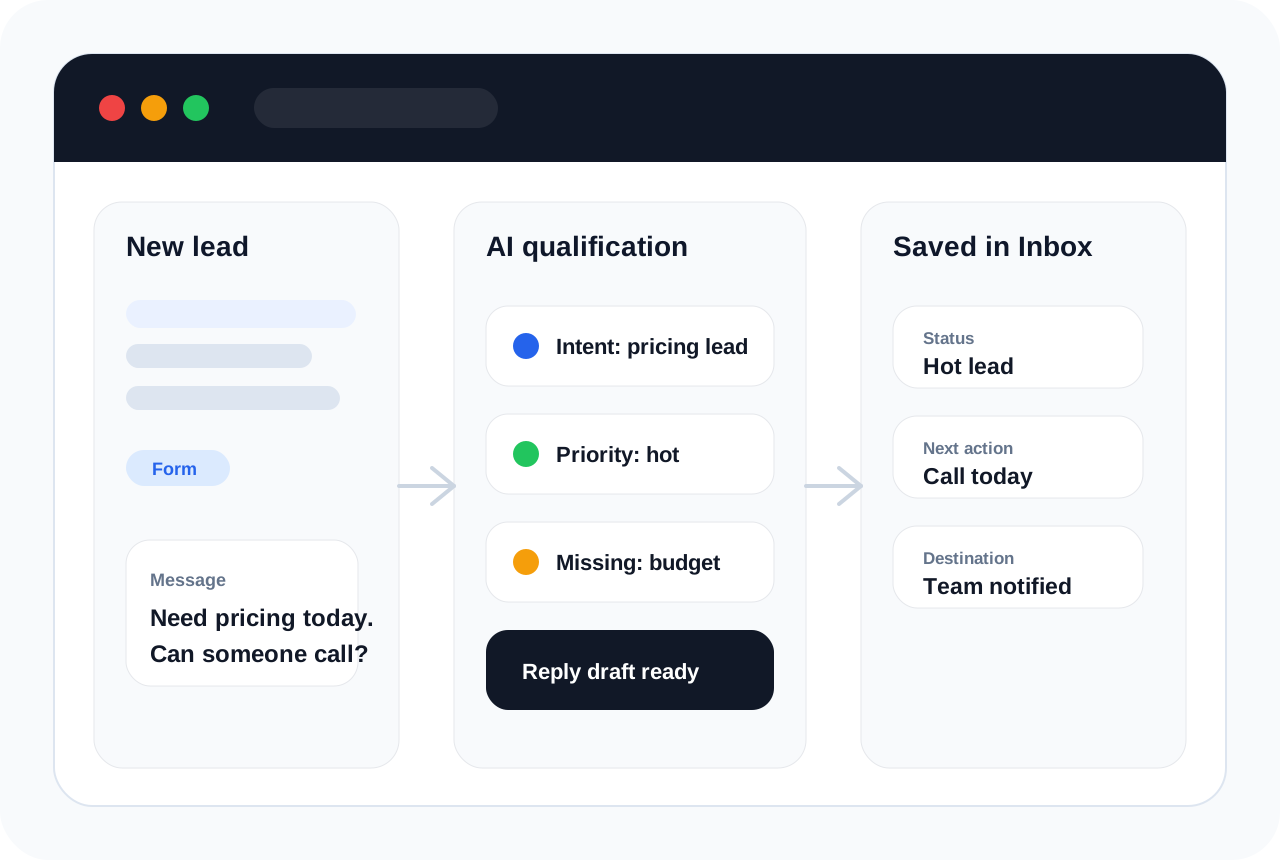
AI lead qualification is the process of using artificial intelligence to review inbound leads, understand what the prospect wants, score their fit or urgency, and recommend the next action for a sales or service team.
Instead of treating every form submission like the same kind of inquiry, AI lead qualification looks at the message, source, requested service, timing, budget clues, contact details, and missing information. The result is a clearer lead record that tells your team what came in and what should happen next.
For small businesses, the practical goal is not complicated: answer better leads faster, avoid missing urgent requests, and keep every follow-up visible for the team.
What AI lead qualification does
- Captures inbound leads from forms, booking pages, widgets, webhooks, and connected tools.
- Reads the prospect message to detect intent, urgency, service interest, and missing details.
- Scores or labels the lead as hot, warm, cold, qualified, unqualified, urgent, or needs review.
- Prepares a reply draft, summary, follow-up question, or team notification.
- Saves the lead status, AI output, source, and timeline in one place.
Why it matters for small teams
Small businesses often lose leads because no one replies quickly enough. A lead might ask for pricing, an appointment, a quote, or a consultation, but that request can sit inside a form inbox, email account, spreadsheet, or chat thread. AI lead qualification gives the team a first pass immediately, so the best leads get attention faster.
This does not mean the AI has to close the sale. The stronger use case is simpler: make every new lead easier to understand, prioritize, and answer.
A simple example
Imagine a visitor submits a website form that says: “Need pricing for a roof repair this week. Can someone call today?” A normal form only stores the message. An AI qualification workflow can turn that same message into a useful lead record.
The AI can label it as a quote request, detect that the timeline sounds urgent, identify that the phone number and address are important, prepare a reply asking for missing details, and notify the right person before the request gets buried.
What data AI lead qualification uses
- Lead source: website form, landing page, booking page, widget, or webhook.
- Message content: what the customer is asking for and how urgent it sounds.
- Contact details: name, email, phone, company, location, or preferred time.
- Business rules: service area, lead type, pricing requirements, appointment rules, or routing logic.
- Historical context: previous requests or notes when the lead already exists in your Inbox.
How the workflow usually runs
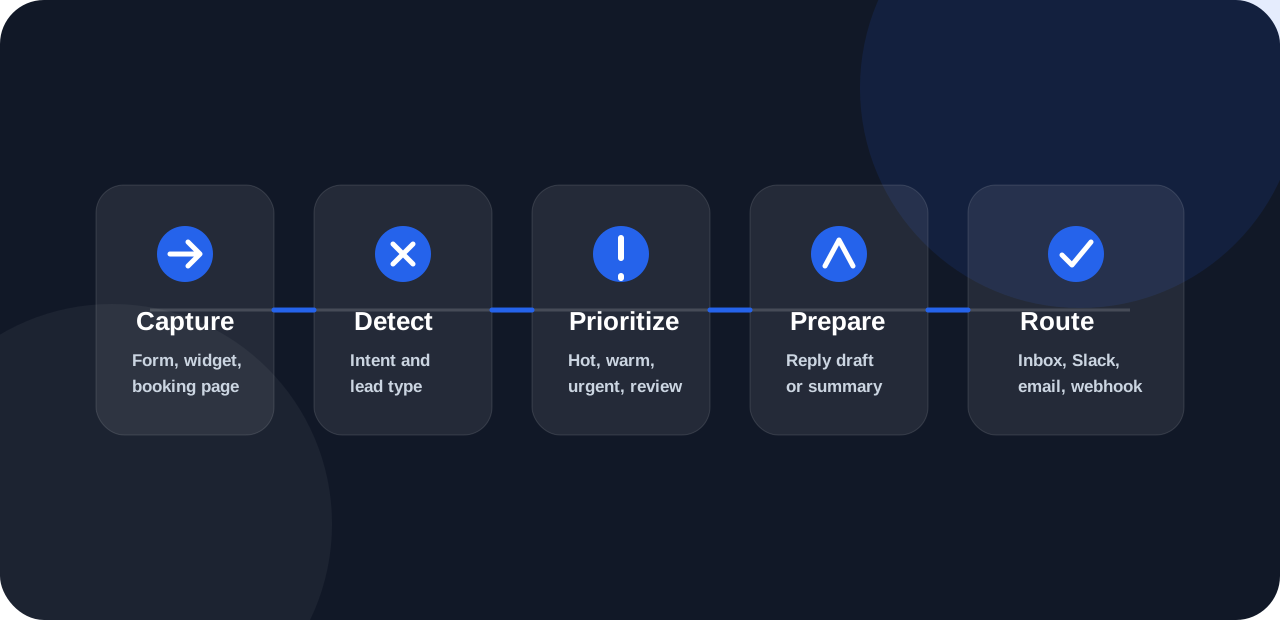
- First, the lead is captured from a form, booking page, website widget, import, or webhook.
- Next, the AI reads the message and decides whether it is a pricing lead, appointment request, quote request, support question, restaurant inquiry, or another request type.
- Then it extracts key details, checks what is missing, sets a status or priority, and prepares a useful next action.
- Finally, the lead is saved with its AI summary, status, reply draft, and timeline so your team can review it without rebuilding the context from scratch.
What a good AI qualification result should include
- Lead type: what the person is asking for.
- Priority: whether it is urgent, hot, warm, cold, qualified, or needs review.
- Important details: service, location, timeline, budget, preferred time, or contact method.
- Missing details: the information needed before your team can answer properly.
- Next action: call, reply, ask a question, book a slot, notify a manager, or send to a destination.
- History: a timeline that shows what arrived, what AI produced, and what happened next.
Where businesses use it
- Sales teams use it to spot hot leads and prepare faster follow-up.
- Appointment businesses use it to separate booking requests from general questions.
- Home service companies use it to identify urgent jobs and quote requests.
- Restaurants use it to route catering, reservation, complaint, and guest messages.
- Support teams use it to triage requests and prepare safer first replies.
- Agencies use it to qualify client leads and document handoff history.
What AI lead qualification should not do
It should not hide important decisions from the team. High-value, sensitive, legal, medical, financial, or risky requests should still get human review.
It should not make up pricing, promises, availability, or policy answers that your business has not approved.
A better setup is to let AI prepare the first useful summary and reply draft, then let your team decide when to send, edit, or automate the response.
Implementation checklist
- Decide which lead sources should feed into the system.
- Define what counts as hot, warm, cold, urgent, qualified, or needs review.
- Write the missing-detail questions your team asks most often.
- Choose whether replies should be drafts, confirmations, or safe auto-responses.
- Connect notifications such as email, Slack, Sheets, Zapier, Make, n8n, or webhooks.
- Review the first batch of qualified leads and tune the rules before scaling.
How HuzAgent handles it
HuzAgent works as an AI front desk for business requests. It captures the lead, classifies the request, identifies important details, prepares the reply or next action, notifies the right destination, and saves everything in one Inbox.
For a deeper product walkthrough, see our dedicated page for AI lead qualification software.
FAQs
Is AI lead qualification the same as lead scoring?
Lead scoring is usually one part of lead qualification. Qualification can also include intent detection, missing-detail checks, reply drafts, urgency flags, and routing.
Does AI lead qualification replace salespeople?
No. It helps salespeople spend less time sorting leads and more time responding to the right prospects.
Can small businesses use AI lead qualification?
Yes. It is often most useful for small teams because they cannot manually review every lead instantly.